Custom MCP, Skills & CLAUDE.md Layers for Claude Code
I hit the limits of vanilla Claude Code and built a setup in three layers — CLAUDE.md hierarchy, custom MCP, and skills. The solo-dev configuration that killed session re-explaining, code by code.
On this page (10)
May 2026 · Lazy Developer
When I started with Claude Code, I ran it vanilla. Just open it and ask. That was fine for a while, but running the same project for months exposed the limits.
I explained the same things every time and fed in the same external work by hand. Claude met me fresh each session, forgetting yesterday's rules. So I built a setup in three layers — CLAUDE.md, custom MCP, and skills.
This post walks those three layers, code by code. What sets it apart from other how-tos: I open up the custom MCP I built myself, the part nobody else has. If you want the whole daily flow, the related post below is the entry point.
Quick look
Split CLAUDE.md into three layers — global, project, folder. Pull daily-repeated external work into a custom MCP, and store long, repeated instructions as skills. Put them together and the session briefing disappears.
Why vanilla Claude Code wasn't enough
Vanilla Claude Code is plenty smart. The problem is that memory and ability reset every time. Open a new session and yesterday's rules and data are gone.
So three things kept repeating: explaining the project, looking up external data, re-typing long instructions. Each is trivial, but daily they outran the coding. I killed them by splitting the work into layers.
Layer 1 — I split CLAUDE.md into three
CLAUDE.md is a note Claude reads automatically at the start of a session — like a handover doc for a new hire. But cramming it all into one page got messy fast.
So I split it into three layers. Like company policy with company-wide, team, and project rules kept separate. Claude merges the three nearest-first.
~/.claude/CLAUDE.md
→ tone, code style, behavior rules (do only what's asked, etc.)
# 2) Project — this repo only
<project>/CLAUDE.md
→ folder structure, naming rules, publish order
# 3) Folder — only complex subdirectories
<project>/<sub>/CLAUDE.md
→ rules that only apply inside that folder
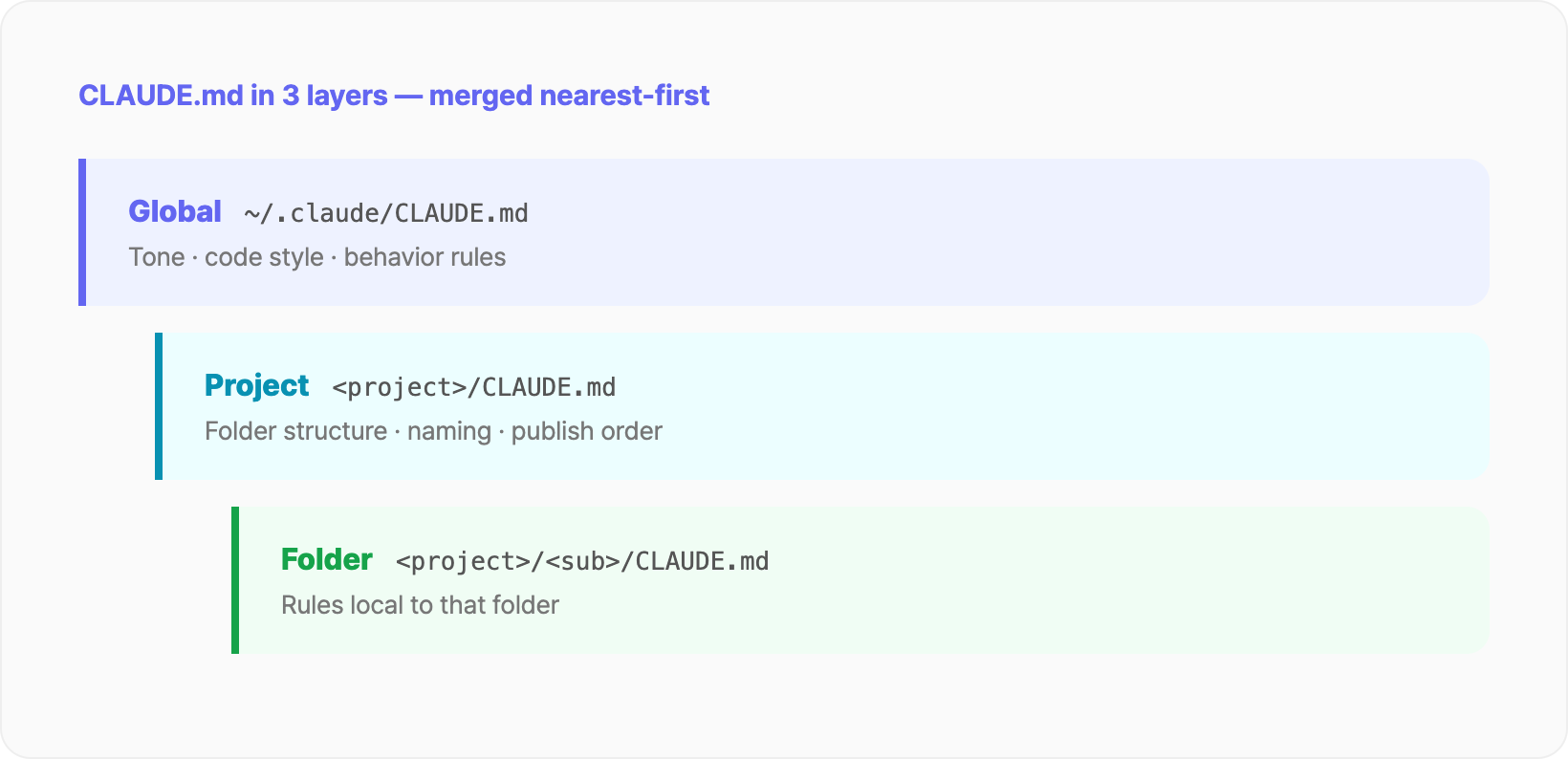
Global holds what applies everywhere. Answer in my language, working code first, don't touch what isn't broken — behavior rules like that. Write them once and they follow you into any project.
The project layer holds rules for that repo only. For a blog project, that's tone, banned words, the publish checklist. The folder layer goes only in genuinely complex subdirectories. Otherwise it gets messy again.
Layer 2 — external work pulled into a custom MCP
If CLAUDE.md removed the "explaining," MCP adds "ability." Think of MCP as a USB port that plugs external tools into Claude. Plain Claude only sees inside my code; with MCP wired in, it pulls app data and external APIs directly.
I built two and wired them in. One for app data, one for my own work.
App-data MCP. I registered revenue, downloads, keyword rankings, and review summaries as tools. So mid-code, "compare this week's revenue to last week" answers without opening a dashboard.
Work-helper MCP. This is the part nobody else's setup has. I put in tools like drafting in my tone, recovering yesterday's work in one line, and researching content gaps. Calling a tool looks roughly like this.
today_resume() → one-line recovery of yesterday
draft_in_my_tone(topic) → draft with my tone rules applied
growth_find_gaps() → topics with search demand I haven't covered
get_revenue(period) → app revenue lookup
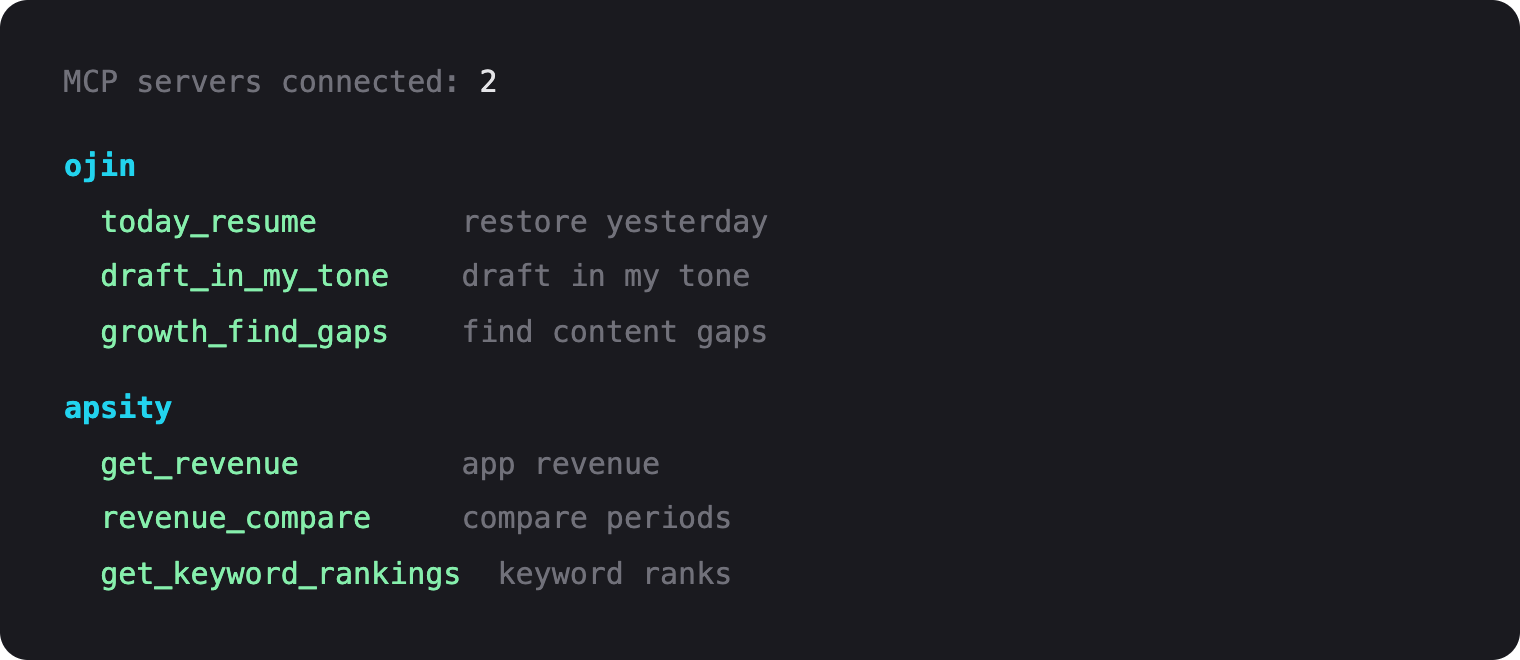
The point is I only pulled out "daily-repeated external work." I don't build one-off tools. An MCP earns its keep only when you repeat the same action by hand every day.
Why I built the MCP myself
There are plenty of MCPs others made. But my work is tied to my tone, my apps, my routine, so generic tools didn't fit. So I built my own.
An MCP server isn't grand. It's a small server defining three things: tool names, input schemas, and handler functions. Declare the tools with the official SDK, and inside, call the APIs or scripts you already use.
The "draft in my tone" tool, for instance, just pulls my tone rules and slots them into the prompt. Not new tech — it froze something I did by hand into a single function. I built 80% first and fixed the rest as I went.
Layer 3 — repeated instructions stored as skills
The last layer is skills. A skill stores a long, repeated instruction as a slash command. Like the "auto" button on a microwave — instead of dialing time and power each time, you press one button.
My pre-publish SEO check, for example, runs the same checks every time. Title, meta description, alt text, internal links. Instead of spelling it out each time, one skill runs the whole check from a single command.
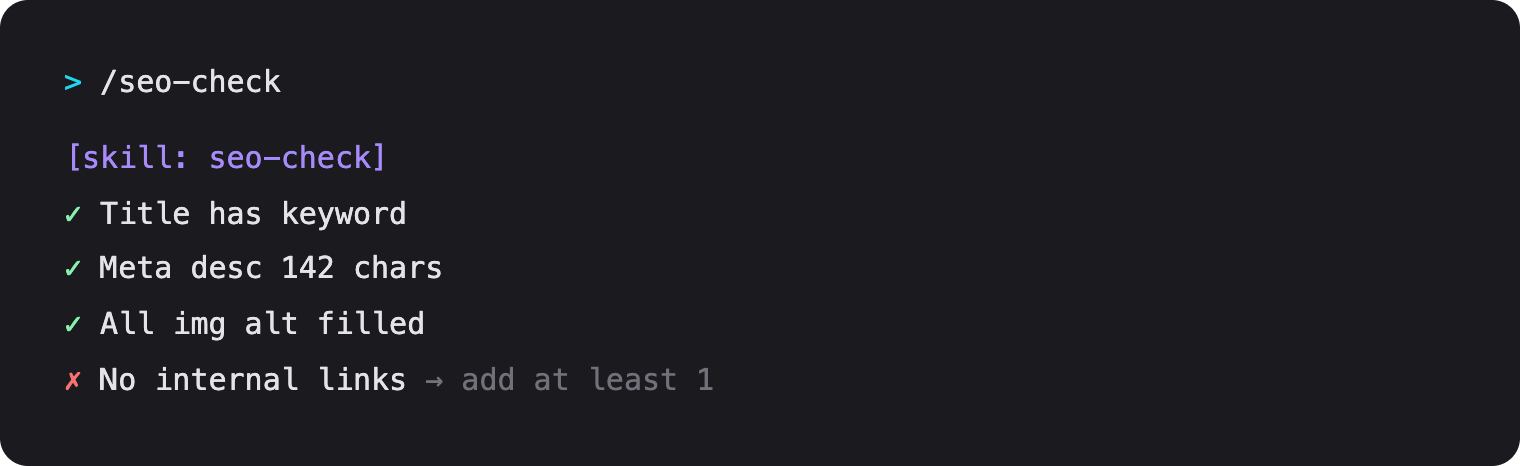
It's easy to confuse with MCP, but the roles differ. A skill is "reuse of instructions"; an MCP is "extension of ability." A skill cuts what I have to say; an MCP grows what Claude can do.
When the three come together
With all three running, the start of a session changes. CLAUDE.md lays down the project context, MCP pulls in yesterday's flow and data, and a skill calls repeated work in one line.
I used to brief for five minutes per session. Now I drop straight into work. All three follow the same principle — "move what a human held every time into the setup." Only the layer differs.
The honest limits
It uses more tokens. The MCP tool list and CLAUDE.md enter the context every session, so it isn't free. I drop unused tools and trim CLAUDE.md when it grows.
Maintenance costs too. If an app API changes, the MCP needs fixing; if CLAUDE.md drifts from reality, it gets in the way. The more setup, the more to tend. I know it. The time saved is bigger, so I carry it for now.
FAQ
Where should CLAUDE.md live?
Three places. Global holds shared style and rules, the project root holds that repo's rules, a complex subfolder holds local rules. Claude merges them nearest-first.
How do you build a custom MCP?
A small server defining tool names, input schemas, and handlers. Declare with the official SDK and call your usual APIs inside.
Skill vs MCP?
A skill stores a long instruction as a slash command; an MCP plugs in an external capability. Skill = reuse, MCP = extension.
Do I need the whole setup?
No. One CLAUDE.md solves most of it. Add skills and MCP only for daily repeats.
Wrap up
All three came from one line: "move what I did every time into the setup." Explaining went to CLAUDE.md, ability to MCP, repeated instructions to skills.
You don't have to build it all at once. I started with one CLAUDE.md, and when something repeated daily, I moved it into an MCP or a skill. See a chore, move it to its layer.
Related
Lazy Developer · Automate Everything
Related Posts
Automating CLAUDE.md for Claude Code Session Context
I got tired of re-explaining project context every time I opened a new Claude session. So I automated CLAUDE.md updates, cowork schedules, and timeline logging — four manual tasks turned into one workflow. Here is how.
Claude Code Workflow for Solo Developers
How I keep Claude Code beside me all day as a solo developer — morning context recovery, CLAUDE.md, four rules, custom MCP, and auto-logging, walked through as one daily loop.
Automating App Growth Analysis with Claude API
A two-month review of the AI Growth Agent built on top of Apsity. AI keyword recommendations, keyword health, confidence badges, growth stages, and the weekly email — walked through screen by screen.