Claude Code Workflow for Solo Developers
How I keep Claude Code beside me all day as a solo developer — morning context recovery, CLAUDE.md, four rules, custom MCP, and auto-logging, walked through as one daily loop.
On this page (9)
May 2026 · Lazy Developer
I've used Claude Code for a while now. At first it was just a tool that wrote code. Now it's different. From the moment I turn the computer on in the morning to the last commit at night, it sits beside me almost all day.
As a solo developer, there's no one next to me to ask. Claude Code fills that gap. But just leaving it open wasn't enough. I re-explained things every session, blocked the same mistakes every time, looked up the same data by hand. That piled up until the chores outran the coding.
So I mapped out the whole day. From morning context recovery to the final log, here's the workflow I actually run. Not a fancy setup — just the path I walk every day.
Quick look
Mornings start by recovering yesterday's context. Work begins with CLAUDE.md doing the explaining. While coding, four rules keep the agent from running wild; data comes from custom MCP through plain chat. Wrapping up, a single commit drags the record along with it.
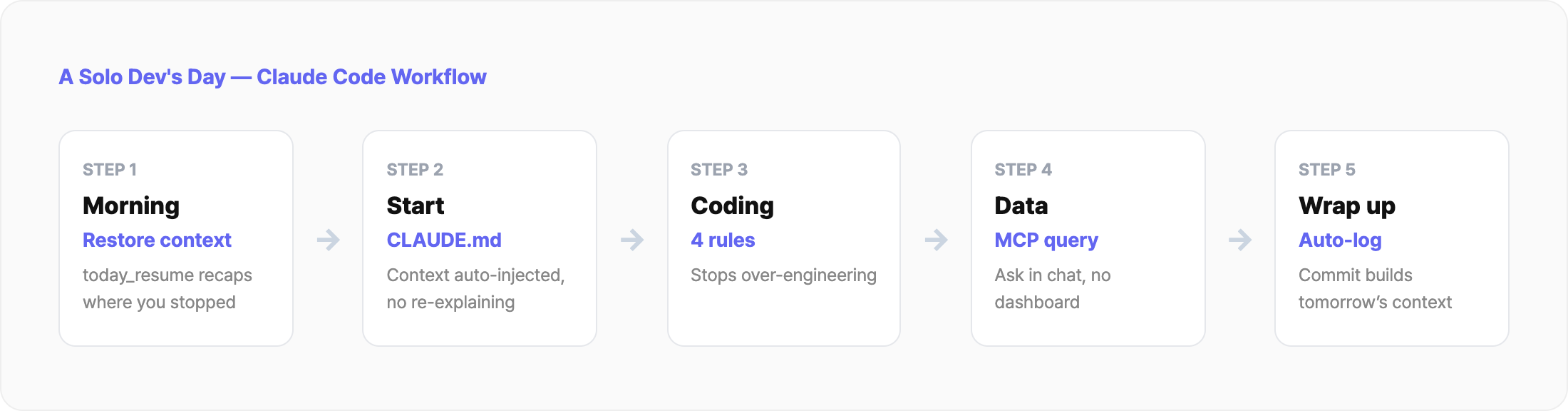
Morning — recover where I stopped yesterday
The first friction of the day was always the same. "Where did I stop yesterday?" Solo work spreads across several projects, so yesterday's context evaporates. I'd dig through commit logs and notes for twenty minutes.
Now I get a one-line recap the moment I open a session. Which project I was touching, where I stopped, and the next move — laid out for me. The time spent staring at a blank screen, fishing for memory, is gone.
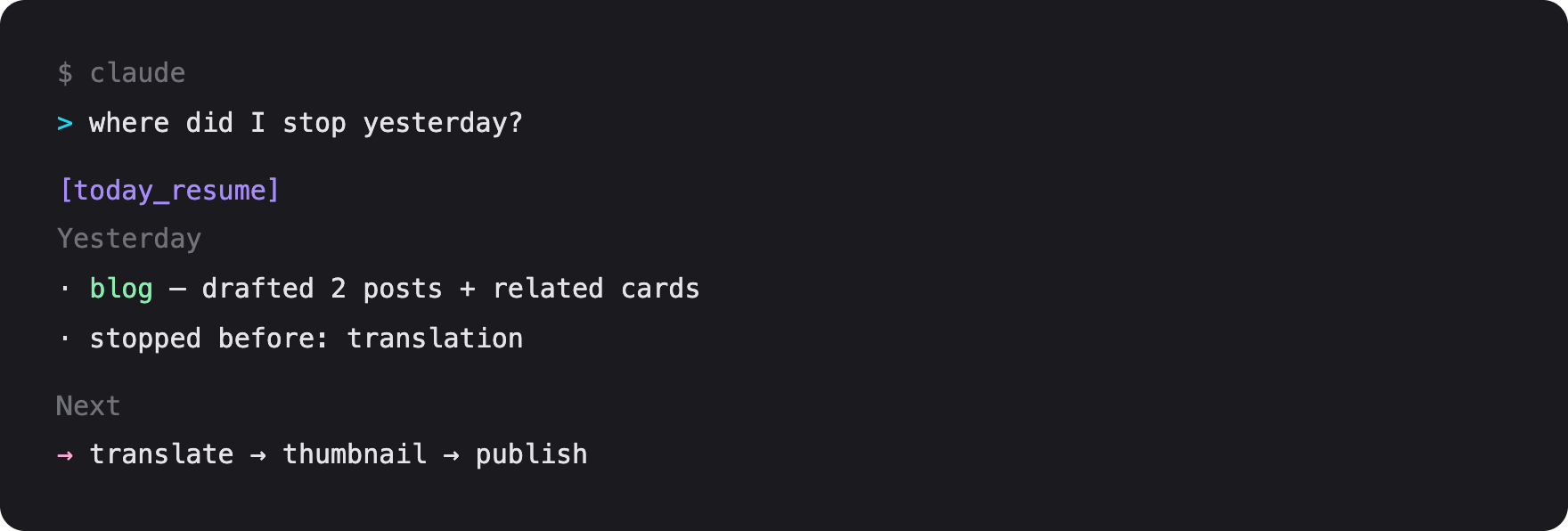
The point is "don't keep the memory in a human head." When a tool bridges yesterday-me and today-me, turning the computer on gets lighter. That sets the tone for the whole day.
Starting work — CLAUDE.md does the explaining
I used to explain the project from scratch every session. Folder structure, naming rules, progress. Open ten sessions a day and I gave the same briefing ten times.
Now CLAUDE.md does that job. It's a note Claude reads automatically when a session starts — like a handover doc you give a new hire.
It holds a one- or two-line overview, the folder structure, the rules, and the next tasks. Open a new session and Claude starts already knowing the project. I can ask "does this function already exist?" right away.
I split this CLAUDE.md into three layers — global, project, and folder. I wrote up that hierarchy and my custom MCP in depth as a separate piece. Here, one line is enough: a file does the explaining.
While coding — rules that keep the agent from running wild
The trap with Claude Code is that it works too well. It bolts on features I never asked for, "improves" code that wasn't broken, writes 500 lines where 200 would do. Left alone, the diff got out of hand.
So I baked behavior rules into the global CLAUDE.md. Do only what's asked. Touch only what needs touching. Ask when unsure. With those in place, the agent runs off and blows things up far less often.
The rules aren't about controlling Claude. The judgment is always mine. I take the suggestions, use them when they're right, block them when they're not. Treating the tool as a partner, not a subordinate, gave better results.
Checking data — I ask app metrics in chat
Mid-coding, I sometimes need a number. Yesterday's revenue, which keyword moved up. I used to open a separate dashboard and hunt for it by eye.
Now I just ask Claude. There's an MCP in the loop here. Think of MCP as a USB port that plugs external tools into Claude. Plain Claude only sees my code; with MCP wired in, it pulls app data directly.
So "compare this week's revenue to last week" gets an answer without opening a dashboard. The context-switch to the browser, mid-code, disappears. My hands never leave the keyboard.
I built this MCP myself, so it's not in anyone else's setup. That part is its own deep topic — I cover it in the related post below.
Wrapping up — the commit drags the record along
At the end of the day I commit. That used to spawn more chores. Open CLAUDE.md and note what I did, drop a line in the timeline, write tomorrow's tasks.
Skip it and the next morning's context broke again. Solving a chore had created another chore. So I made the wrap-up routine itself run automatically.
Now when work ends, the record follows on its own. Today's changes get summarized, and tomorrow's recovery context piles up in advance. The "morning recovery" from the top is actually built here, the night before.
Honestly, this part still isn't great
It's not all upside. Tokens cost money. Keep it open all day and you spend accordingly. So I cut sessions short and move repeated instructions into files, instead of burning the same explanation as tokens every time.
Maintaining the setup costs something too. If CLAUDE.md drifts from reality, it hands the agent an outdated map. Automation shrank that, but not to zero. I know it. The time saved is still bigger, so I let it ride for now.
FAQ
What should I do first with Claude Code?
CLAUDE.md. Writing the overview and rules removes the per-session explaining first. Automation and MCP come after.
Is Claude Code better than Cursor for solo devs?
Different purposes. Claude Code is an agent that edits many files on its own, strong for automation. Inline-edit-heavy work may fit another tool. I lean on automation, so it's my main.
Isn't the token cost a problem?
It is. Short sessions and file-based instructions cut it down. The time saved still wins for me.
Do I have to build a custom MCP?
No. Built-in tools are enough. Only pull a daily-repeated external task into an MCP.
Wrap up
There's no secret sauce. I just handed each repeated chore to a tool, one at a time. Morning recovery, session briefing, runaway prevention, data lookups, wrap-up logging. Five handed off, and the day got lighter.
The whole thing is one line: "move what a human was holding into a tool." Move 80% fast, fix the last 20% when a real problem shows up. See a chore, automate it.
Go deeper
Lazy Developer · Automate Everything
Related Posts
Custom MCP, Skills & CLAUDE.md Layers for Claude Code
I hit the limits of vanilla Claude Code and built a setup in three layers — CLAUDE.md hierarchy, custom MCP, and skills. The solo-dev configuration that killed session re-explaining, code by code.
Automating CLAUDE.md for Claude Code Session Context
I got tired of re-explaining project context every time I opened a new Claude session. So I automated CLAUDE.md updates, cowork schedules, and timeline logging — four manual tasks turned into one workflow. Here is how.
Automating App Growth Analysis with Claude API
A two-month review of the AI Growth Agent built on top of Apsity. AI keyword recommendations, keyword health, confidence badges, growth stages, and the weekly email — walked through screen by screen.