Automating App Growth Analysis with Claude API
A two-month review of the AI Growth Agent built on top of Apsity. AI keyword recommendations, keyword health, confidence badges, growth stages, and the weekly email — walked through screen by screen.
On this page (10)
- AI keyword recommendation — copy and paste 100 characters as-is
- Keyword health — shows which keywords to drop
- Insight cards — three confidence badges separate fact from guess
- Growth stage — analysis depth adjusts to your data volume
- Weekly email — one short message on Monday morning
- Refreshes overnight, the user just sees results
- Two months in, which screens I actually open
- Why I built it myself
- FAQ
- Wrap-up
May 2026 · Lazy Developer EP.03
In EP.02 I wrote about building the Apsity dashboard. Twelve apps' data flows in while I sleep; in the morning I open one screen and see how yesterday went, across all of them. The 25-minute morning routine shrank to under 5.
Two months in, that 5 minutes ended with a different kind of headache. The numbers were there, but "what should I do about them" wasn't. The household-finance app's downloads dropped 22% yesterday. The chart was red. Why it dropped, what to change — I still had to dig that out myself.
The dashboard shows what's happening. It doesn't decide. So I added an analysis layer on top of it: the AI Growth Agent inside Apsity. This post walks through the screens that layer added.
- AI keyword recommendation — copy-and-paste-ready 100-character slots per country
- Keyword health — what to untrack, sorted at a glance
- Insight cards — three confidence badges: confirmed, possible, suggested
- Growth stage — analysis depth auto-adjusts to your data volume
- Weekly email — one short message every Monday morning
- Refreshes overnight; you only see results
AI keyword recommendation — copy and paste 100 characters as-is
At the top of the Keywords page is a button: "AI keyword optimization." Press it, and the agent analyses keyword slots across all ten of that app's countries in one go. Wait about 100 seconds, and recommendation cards stack up — one per country. Korea, Japan, US, Germany, France: each a separate card.
Inside each card, five comma-separated keywords are laid out in bold, fitting under 100 characters. The string is ready to copy to clipboard. Paste it straight into the App Store Connect keyword field and you're done. No need to retype or massage.
If you just toss "recommend me keywords" at an AI, half the result is generics: app, free, best, top. The Korean version returns 앱, 어플, 쉬운, 간단. Nobody searches for those on the App Store. So Apsity's recommendation works differently. The AI doesn't generate the words. Code gathers candidate words from live App Store search results and filters to those with a difficulty score of 25 or below. Only after that does Claude pick the final five. There's no slot for generics to slip through.
Keyword health — shows which keywords to drop
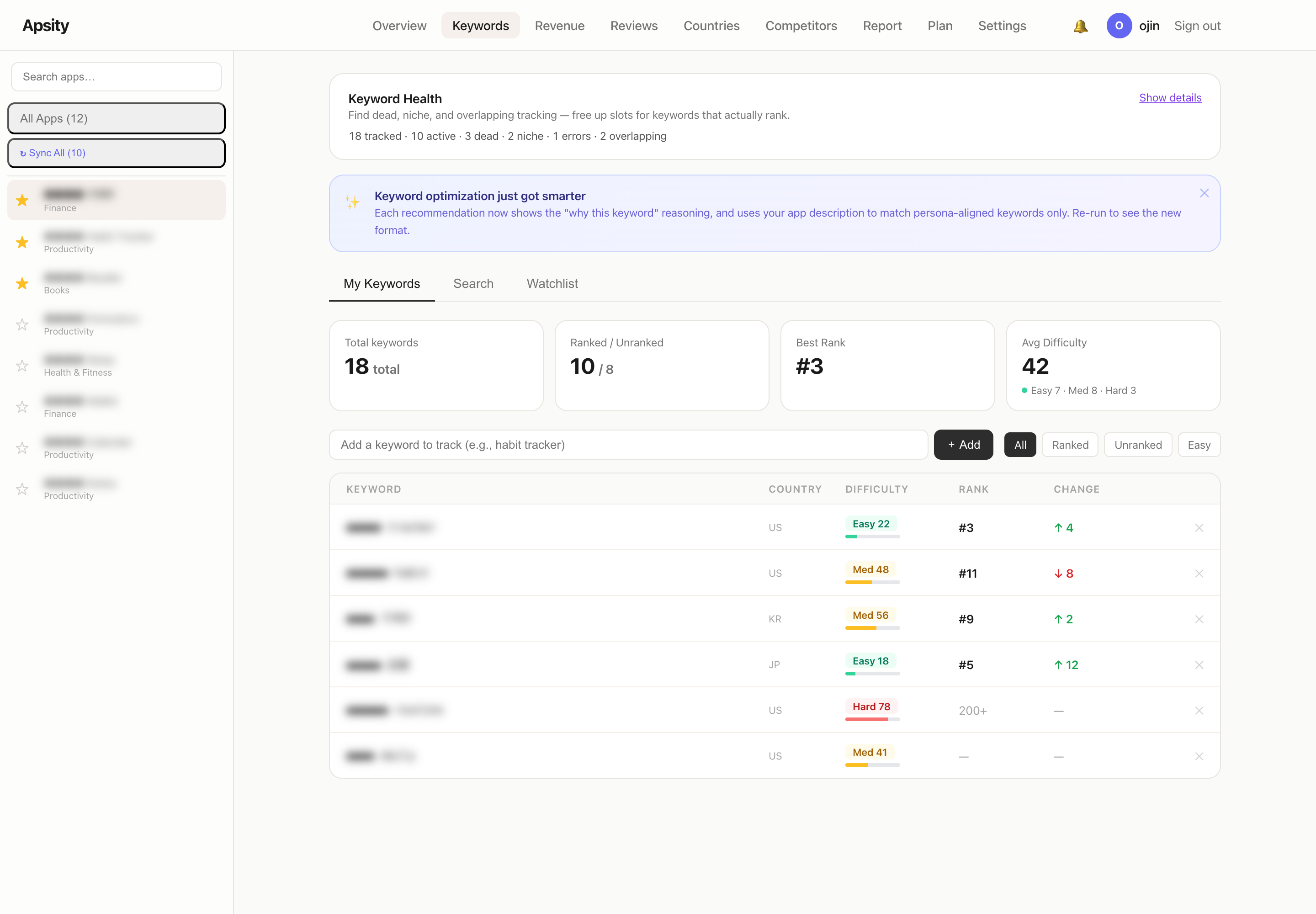
Before adding new keywords, you have to drop the dead ones. The 100-character slot has to make room. The Keyword Health panel sits at the top of the same Keywords page. It sorts the tracked keywords into four buckets automatically.
Dead are keywords that haven't ranked in 30 days — registered, but invisible in search. Niche means there are so few results that ranking #1 still doesn't drive clicks. Errors are keywords whose search keeps returning empty, usually due to special characters or odd combinations. Overlapping is when two or more apps track the same keyword — one app per keyword is enough; the extras burn slots.
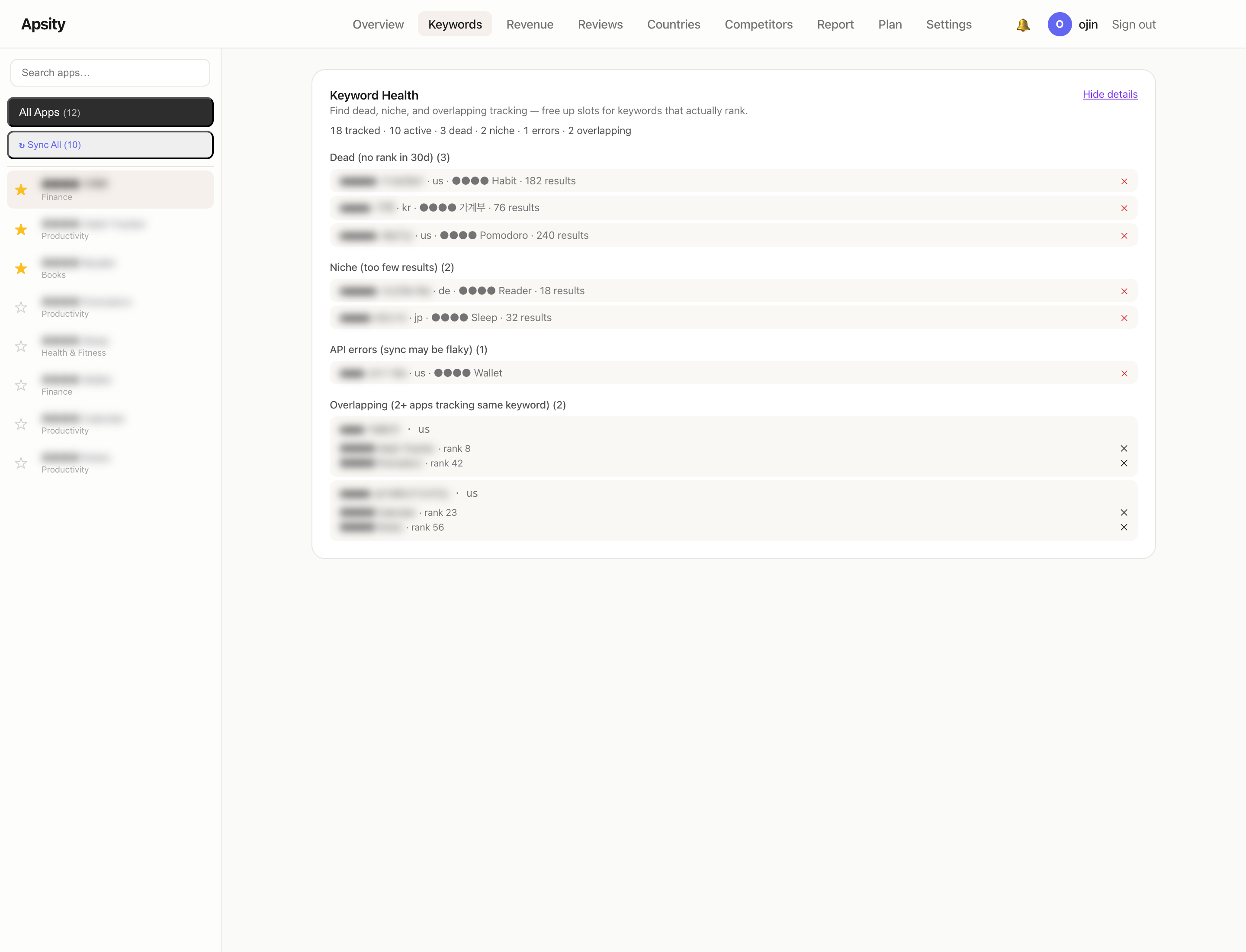
A one-line summary sits up top: "18 tracked · 10 active · 3 dead · 2 niche · 1 errors · 2 overlapping." Show details expands the buckets in place. Hit ✕ once and the tracking is gone. The freed slot is what the next step fills with AI-recommended keywords.
Insight cards — three confidence badges separate fact from guess
On the dashboard's main view, there's an "AI Growth Agent" section. Cards stack vertically. Each card is one insight: a fact like "yesterday's revenue dropped 32%," a correlation like "the keyword's rank dropped on the same day the competitor changed their subtitle," a market signal like "Japan downloads jumped 80%."
Each card carries a confidence badge. 🟢 Confirmed is grounded in observed data. 🟡 Possible is a correlation between two events that happened on the same day — causation unverified. ⚪ Suggestion is AI inference. It's a safety net against the AI saying "A caused B" definitively. The same card lands differently depending on the badge — strong signal or light reference.
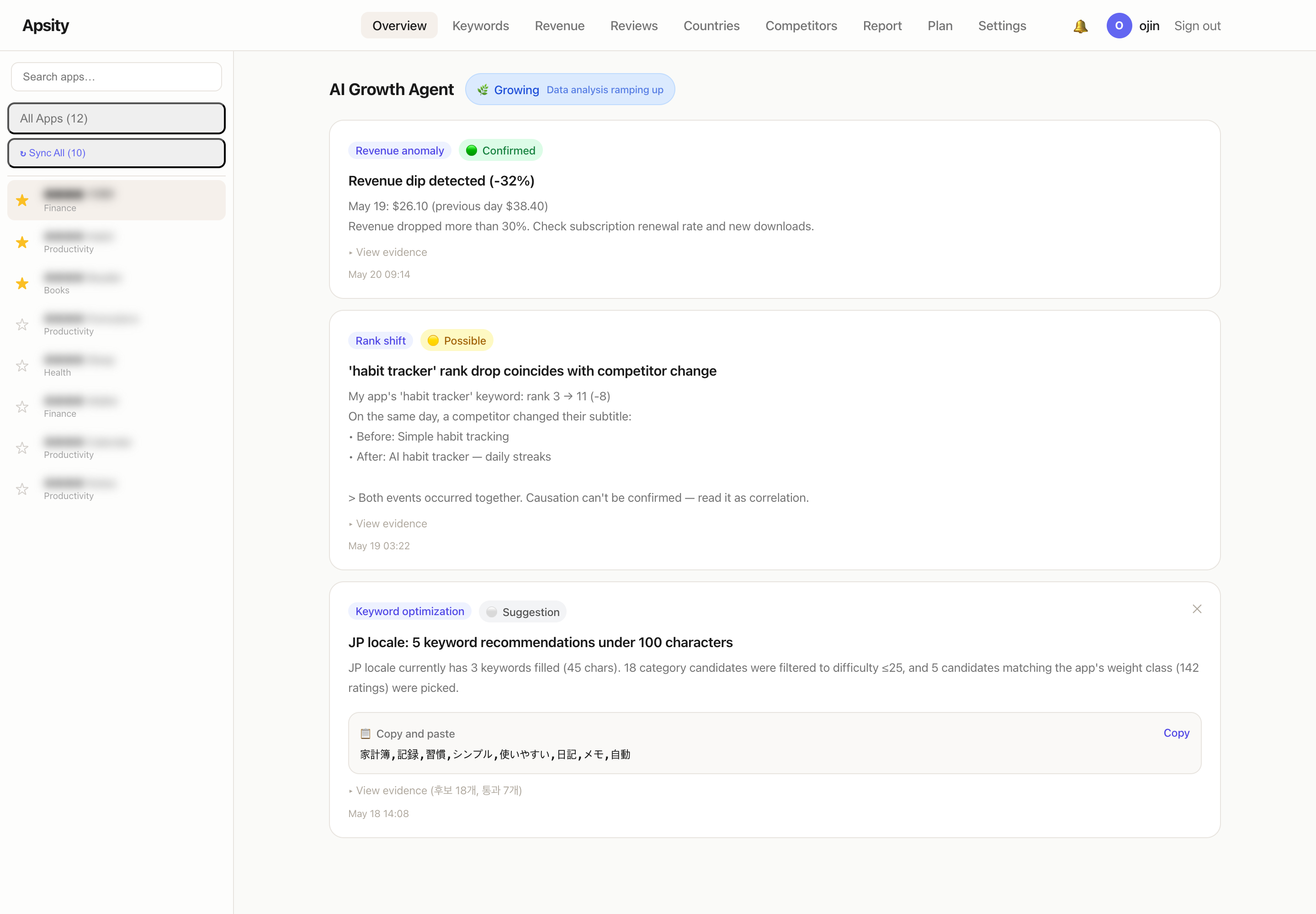
There are two extras inside each card. First, a "📋 Copy and paste" box. For a keyword recommendation card, the full 100-character string is there in monospace. Second, a "▸ View evidence" toggle. Expand it to see what data the insight was built from. For a keyword card, the evidence shows 18 candidates were considered, 7 passed the difficulty filter, and 5 were picked.
Growth stage — analysis depth adjusts to your data volume
Each app gets a growth-stage badge: 🌱 Seed, 🌿 Growing, or 🌳 Stable. The user doesn't pick. Each day the system reads rating count and downloads and re-decides automatically.
Why split into stages? A just-launched app and a stable one need different things. A brand-new app has no analysis material — there's no revenue movement when there's no revenue. For those, only keyword and app-name optimisation run. Stable apps have patterns. Revenue anomalies, rank shifts, market signals: the full set of patterns runs.
So a Stable app collects lots of cards. A Seed app shows mostly just keyword recommendations. Without the user setting anything, the analysis depth fits where the app is.
Weekly email — one short message on Monday morning
Every Monday morning, one email arrives. Sent on the user-configured timezone and day. Korean users get it at Monday 08:00 KST; US users get it at the same hour in their own timezone. A 6-day dedupe makes sure the same person doesn't get a duplicate inside the same week.
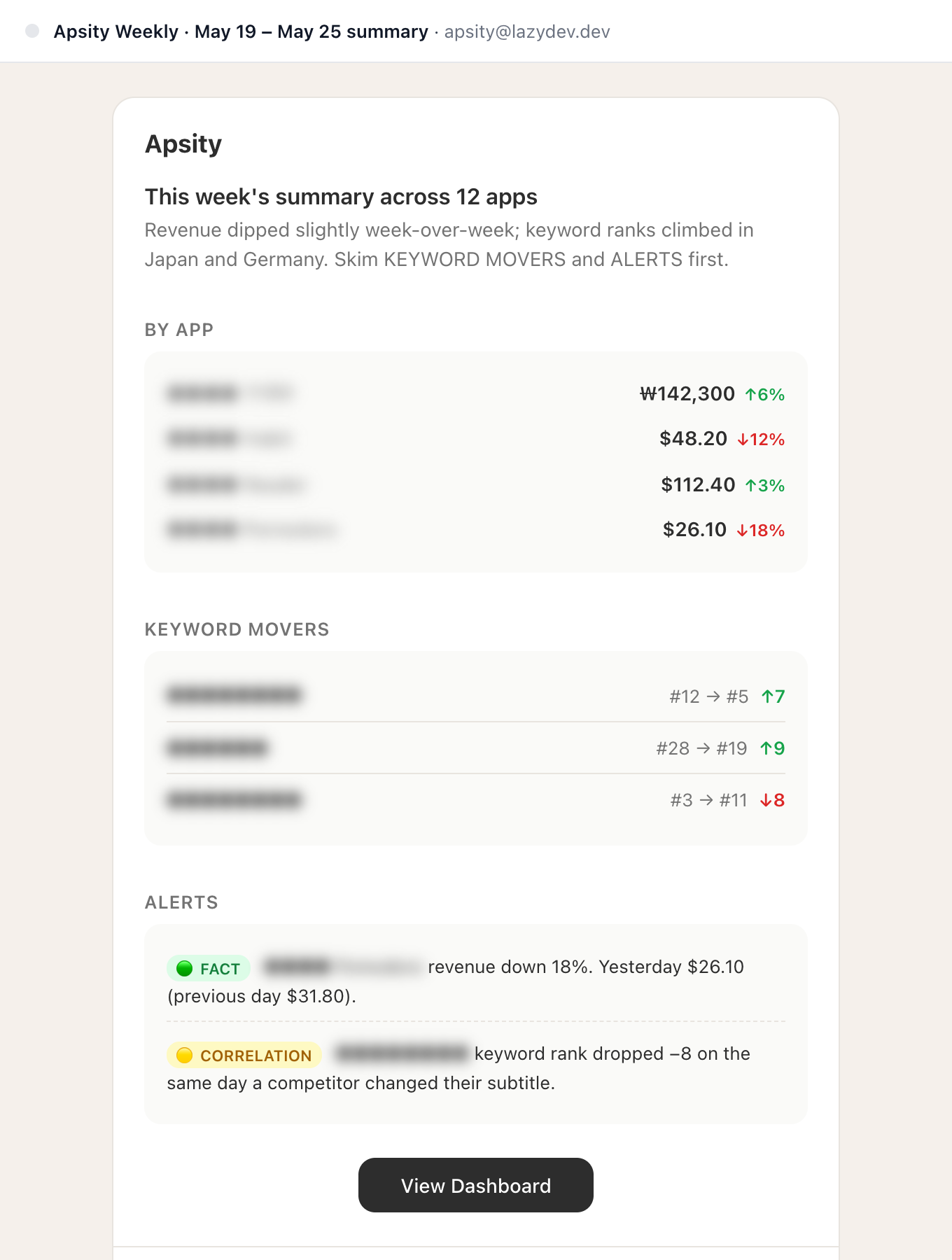
The email has three sections. BY APP — yesterday's revenue per app with the change arrow (↑↓). KEYWORD MOVERS — three keywords with the biggest week-over-week rank movement. ALERTS — two lines of insights, each with a confidence badge. The whole thing is sized to fit one mobile screen — skim it on the commute and you're done.
At the bottom is a "View Dashboard" button. If you want detail, that takes you into the full Apsity view. On weekdays, sometimes the email is all I open.
Refreshes overnight, the user just sees results
The data behind insight cards and the weekly email refreshes automatically every dawn. Revenue changes, keyword rank movements, competitor edits, growth-stage redecisions — all of it. The user just opens the app in the morning.
The exception is AI keyword recommendation. That doesn't auto-run; it triggers only when the user presses the button. A single run analyses 10 countries at once, hits the search API for every candidate word, and costs both time and tokens. So pressing the button again on the same app within an hour brings up "Please try again in an hour." It's a guard against re-running before the previous result has been actually used.
AI keyword optimization is also gated behind a paid plan. Free users see "Available on Starter plan and above." The other analyses (insight cards, weekly email, growth-stage badges) are partially available on free.
Two months in, which screens I actually open
When I built it, every screen felt important. Two months later, the daily set narrowed. What I open every day: the insight cards and keyword health. A few times a week: AI keyword recommendation cards and the weekly email. A couple of times a month: growth-stage badges — when a Seed app crosses into Growing, a single notification fires.
The biggest measurable win was the AI keyword recommendation. Per-country keyword work that used to take 30 minutes now takes 1. Before this, only English-speaking countries had hand-curated keywords; Japan, Germany, and France were neglected. Two months in, downloads from those three rose by 12% on average. I attribute that to the keyword slots finally being used.
It's not 100% automated. Of the 5 keywords the AI recommends, 1–2 still get pulled by hand. Occasionally a household-finance app sees "shopping" creep into the candidates because of an unrelated category overlap — low difficulty, off-topic. A 30% human pass on the final output is the current state.
Why I built it myself
There are similar analysis tools. Sensor Tower, AppFollow, MobileAction. All good. The catch is that registering 12 indie apps drives the subscription cost up, and 80% of what they offer goes unused. Global market trends, category comparisons, ad intelligence — that's for enterprise analysts. I just needed "yesterday's revenue and keyword-slot suggestions for my 12 apps."
So I added the analysis layer onto Apsity myself. Toss requirements at Claude, code comes back, ship to Vercel. Two months of running costs sit inside Supabase's free plan and Vercel's free plan.
Even with the agent in place, a new kind of friction appeared. The next EP moves to a different app — building a SaaS in 7 days as a solo indie developer.
FAQ
Q. What is the AI Growth Agent?
It's an analysis layer sitting on top of Apsity. The dashboard shows numbers; the agent tells you what to do with them. Keyword recommendations, keyword health, change detection, market opportunities — each surfaced as a card with a confidence badge attached.
Q. How does the AI keyword recommendation work?
The AI doesn't invent words. Code collects candidate words from App Store's live search results, filters out high-difficulty ones, and only then does Claude pick the final five. There's no opening for generic words to slip in.
Q. What do the three confidence badges mean?
🟢 Confirmed is observed data. 🟡 Possible is a correlation between two same-day events. ⚪ Suggestion is AI inference. The badges keep the AI from claiming "A caused B" definitively.
Q. Does this work for Google Play?
AI keyword recommendation is iOS-only — Google Play has no separate keyword slot. But change detection and confidence-badged insights apply to other markets without changes.
Wrap-up
Two months in, what I open daily is the insight cards and keyword health. A few times a week, the AI keyword recommendation and the weekly email. The screen list felt huge during build; the daily set turned out to be two or three.
Adding an analysis layer on top of the dashboard is the whole story of these two months. A screen that used to just show numbers now also says "drop this keyword" and "paste these 100 characters." Next EP, a different app.
Posted in May 2026. As of this writing, the AI Growth Agent is analysing daily changes across 12 apps.
Related Posts
Automating CLAUDE.md for Claude Code Session Context
I got tired of re-explaining project context every time I opened a new Claude session. So I automated CLAUDE.md updates, cowork schedules, and timeline logging — four manual tasks turned into one workflow. Here is how.
Building an App Store Connect API Dashboard
Apsity is the dashboard I built to combine 12 apps' revenue, keywords, and competitors into one screen. Two months in, my 25-minute morning routine dropped to under 5.
Custom MCP, Skills & CLAUDE.md Layers for Claude Code
I hit the limits of vanilla Claude Code and built a setup in three layers — CLAUDE.md hierarchy, custom MCP, and skills. The solo-dev configuration that killed session re-explaining, code by code.