Why every site asks you to accept cookies
Every site you open, a cookie banner slides up from the bottom. "Do you accept cookies?" You said yes yesterday. It's asking again today. Why??
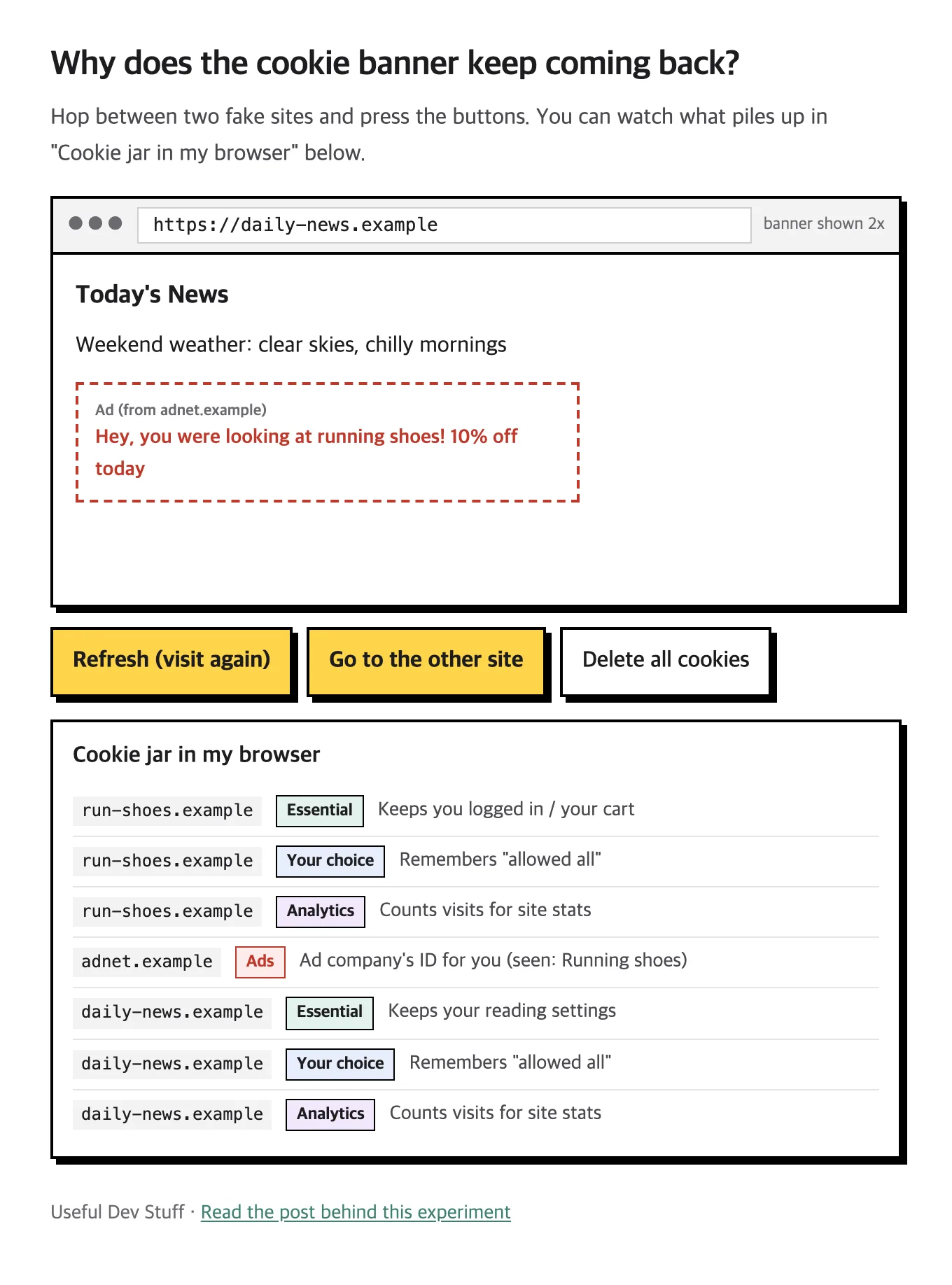
I got curious and built an experiment that lets you watch cookies pile up. I hit "Allow all" on a shoe shop, then went to a news site, and the running shoes followed me there. That's exactly why cookie banners exist.
A cookie is a note the site leaves behind
A cookie is a small note a site sticks in your browser. Think of a coffee shop stamp card. Next time you show up, they read it and go "oh, it's you."
Those notes do a lot of useful work.
- Keeping you logged in
- Remembering what's in your cart
- Remembering settings like dark mode or text size
The site breaks without these, so they're called essential cookies. They stay even if you pick "Essential only."
The problem is notes from other companies
Some cookies don't come from the site you're on. Another company leaves them. When a site adds an ad or analytics tool, that company can leave notes in your browser too.
Now picture an ad company with ads on thousands of sites. It writes "this person looked at running shoes" on the shoe shop, then reads the same note on a news site. That's how the product you looked at follows you around the web.
Handy sometimes. But it also means a company you've never heard of knows where you've been. So Europe made it law: ask first before using these cookies. The rule existed earlier, but banners exploded in 2018 when Europe's privacy law (GDPR) made consent much stricter.
Try it: look inside the cookie jar
Hop between two fake sites and press the buttons. You can watch what piles up in the cookie jar below.
Here's a good order to try.
- "Allow all" on the shoe shop → watch an ad company cookie appear
- "Go to the other site" → another banner. "Allow all" there too
- Check what shows up in the ad slot
- Start over and pick "Essential only" instead
With "Essential only," the ad company cookie never shows up. You still see an ad, just a generic one that doesn't know what you looked at.
The real reason the banner keeps coming back
Hit "Delete all cookies" in the demo and the banner comes right back. That's the whole trick.
Your answer to the banner is itself stored in a cookie. Lose the cookie and the site forgets your answer, so it asks again.
Cookies disappear more often than you'd think.
- Private windows: closing the window wipes every cookie
- Browser cleanup: Safari is known to delete cookies that sites set with scripts after about a week
- Clearing cookies: a cleanup app or a browser setting wipes them all at once
- Different device or browser: allowing on your phone means nothing to Chrome on your laptop
Every site asking separately has the same cause. Cookies are kept per site, so site B can't see what you told site A.
So what happens if you don't accept?
Usually, nothing bad. Pick "Essential only" or "Reject" and logging in and your cart still work fine.
Here's what changes.
- Ads stop matching your interests
- Your visit counts less in the site's analytics
- Occasionally an embedded video or map gets blocked
And "Allow all" isn't dangerous either. The difference is simply how much about you piles up at ad companies.
One fun connection. If you block every cookie, you may see more "I'm not a robot" puzzles. With no normal browsing history, you start to look like a bot.
The one-line version
The cookie banner keeps coming back because even your answer lives in a cookie. If it bugs you, pick "Essential only." The site works fine, and fewer ads follow you around.