
Why do sites demand a special character in your password?
Every signup form yells the same thing in red. "Must include a letter, a number and a special character." So you stick an exclamation mark on the end. Is that actually safer??
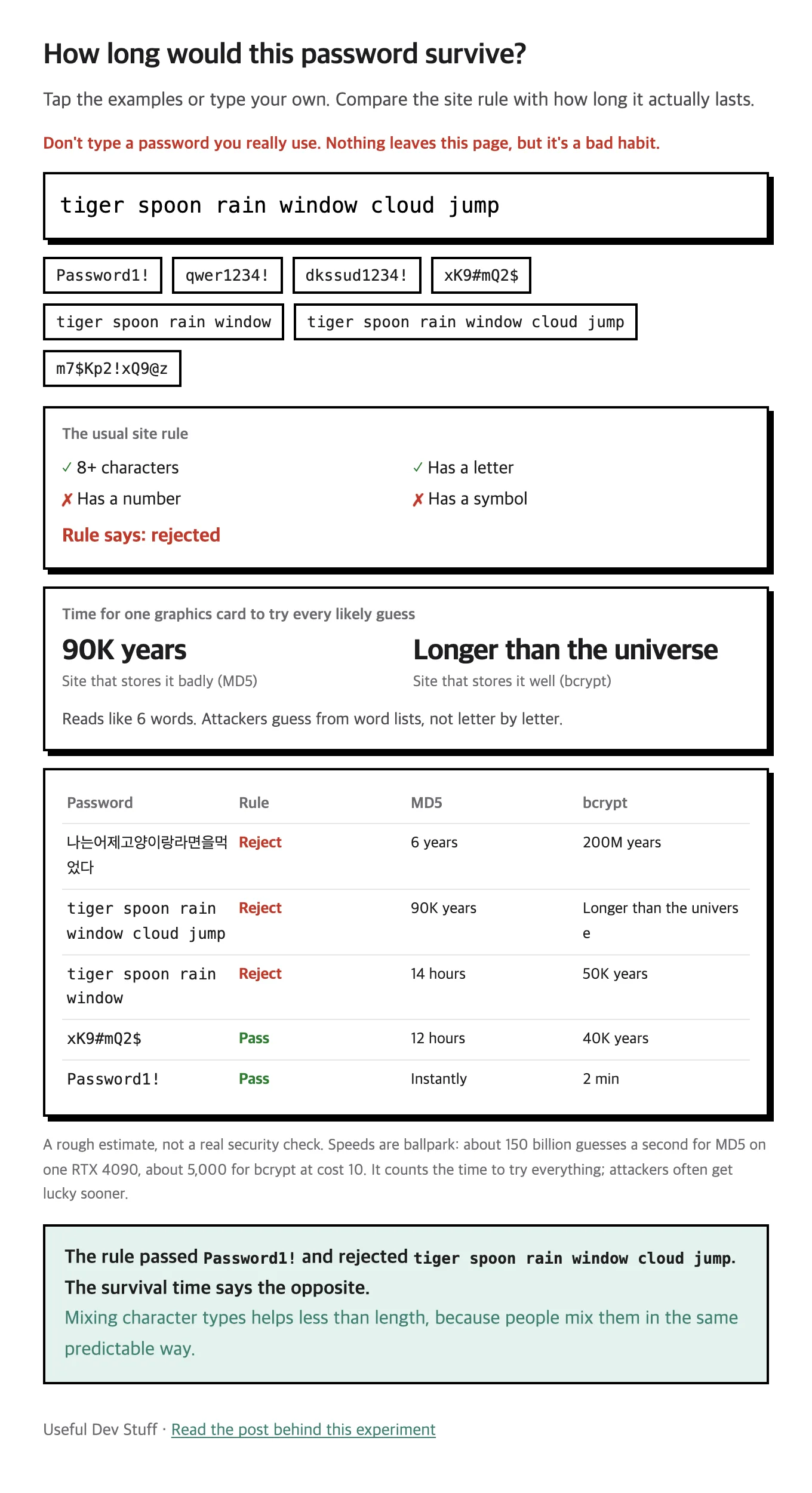
I got curious and built an experiment that puts the site rule next to how long a password actually lasts.
Password1! passed the rule and survived for "instantly."
A six-word phrase got rejected by the rule and scored 90K years.
The rule made sense at first
More kinds of characters means more combinations to guess. Think of a combination lock with only digits versus one with letters too.
The math is real.
- 8 lowercase letters: about 200 billion combinations
- 8 of any keyboard character: about 6.6 quadrillion
The logic is perfect so far. The problem is that humans make the passwords.
Everyone mixes the same way
Ask for a capital and it goes at the front.
The number goes at the end, usually a 1, then an exclamation mark.
There's a reason Password1! keeps showing up.
The US standards body NIST says as much.
Its guidance notes that people respond to these rules in predictable ways, and uses Password1 as the example.
Attackers don't guess one letter at a time. They start with leaked password lists and dictionaries, then apply "capitalize the first letter, add a number, add a symbol." A password built to the rule sits near the front of their queue.
Try it: how long does it last?
Tap the examples or type a made-up password. Don't enter one you really use. Nothing leaves this page, but it's a bad habit.
And to be honest, four words like tiger spoon rain window are weaker than they look.
That's 14 hours against a badly built site.
Length matters, but how hard it is to predict is the real measure.
But can anyone really guess that fast at a login page?
No. Login pages lock you out after a few misses and throw an "I'm not a robot" check at you.
The times in the demo are for after a site gets breached and its stored passwords leak. From then on an attacker can run guesses on their own machine with no limit.
Well-run sites don't store your password as is. They run it through something like a blender, so it can't turn back into the original. That's called a hash.
Attackers can't un-blend it either. Instead they blend candidates one by one and check for a match.
So the speed of the blender matters a lot.
- MD5: an old method. About 150 billion guesses a second on one RTX 4090
- bcrypt: deliberately slow. About 5,000 a second at the setting in the demo
The same password can last "12 hours" or "40K years" depending on the site. And you have no way of knowing which one you signed up for.
So what's the rule now?
NIST's latest guidance (SP 800-63B-4), finalized in 2025, is refreshingly blunt.
- Sites must not force a mix of character types
- A password used alone must be at least 15 characters
- Sites must not force periodic changes (only on evidence of compromise)
- Sites must check new passwords against common and leaked lists
- Sites should allow at least 64 characters
That "change your password every 90 days" popup was never helping. Everybody just bumps the last digit by one.
The real danger is somewhere else
The easiest attack isn't cracking anything. It's reuse. Logins leaked from site A get tried on sites B and C.
A complicated password used everywhere still fails. So here's the practical answer.
- Use a different password for every site
- Let a password manager remember them
- Turn on two-factor login for accounts that matter
- If you have to make one up, use six or more random words, never a famous phrase
If a site demands a special character, just add one. Just don't believe that's what kept you safe.
The one-line version
A special character gets you past the rule. Length, unpredictability and never reusing it are what protect you.